





Auto Response Text for Enquiry Acknowledgements and Next Steps

An automated text should tell the customer what was received and what happens next. Plan AiDial SMS responses around the event, recipient and wording your team approves. Messaging triggers, inbound replies and connected-system actions depend on the project and provider configuration; they should be confirmed before launch.

24/7 Instant Call Support

AI voice

Authentic Australian Voices

Smart Ticket Routing

Escalation to Human Agents

CRM & Knowledge Base Integration

Multi-Channel Support

Write an acknowledgement that does a useful job

For example, an after-hours enquiry response might say that the request was received, state the team’s contact hours and explain whether a reply is monitored. It should not promise an appointment or a callback deadline that staff have not accepted. Keep the message short enough that the next step is easy to understand.

Use SMS automation for the broader messaging service, and the after-hours follow-up checklist to define who handles the request.

Why teams use AiDial for this work

Instant Response & Resolution

Provide immediate answers to common questions while complex issues are escalated to human agents seamlessly.

Ensure 100% Australian Compliance

Operate with confidence, knowing your data is hosted locally and meets all privacy laws.

Cut Your Customer Support Overheads

Reduce customer support costs by up to 70% while improving service quality.

Scale Support Capacity Instantly

Meet any customer demand by instantly scaling to manage peak enquiry volumes and business growth, without the overhead of extra staff.

Seamless Human Handover

Complex queries are smoothly transferred to your team with full conversation context and customer history.

Eliminate Staffing Disruptions

Enjoy uninterrupted customer service without sick days, holidays, or staff turnover disruption. Your AI specialises in consistent, reliable support around the clock.

Collect only what the workflow needs

The trigger needs the correct recipient, an approved purpose and any reference used in the message. Avoid including sensitive enquiry details that are unnecessary for the acknowledgement. Record which event produced the text so repeated events can be investigated.

All AI software and data remain within Australian cloud infrastructure

Compliant with Australian data sovereignty laws

Multi-layered firewalls and strict access control

End-to-end encrypted conversations and data storage

Australian voices with clear pronunciation

When a phone conversation leads to a text, confirm the recipient number and describe what the message contains. The call should not claim that delivery succeeded merely because a send was attempted. Agree how staff handle an invalid number or an undelivered message.

Smiling woman with red hair
Ivy
attractive older man smiling - Smiling man outdoors
Hunter
close businesswoman smiling face - Smiling businesswoman in a modern office
Willow
automation legal industry - Smiling man in a library
Liam
cheerful teenage girl smiling face portrait - Smiling woman in a beige turtleneck
Evelyn
portrait young man smiling - Smiling young man in a casual shirt
Finn

Send each request to the right place

Route calls by the caller’s need, business hours and approved destinations. If nobody is available, AiDial follows the agreed message, callback or escalation path.

Keep people in control of exceptions

Intelligent Call Escalation

Give replies and unresolved requests a named team. An automated acknowledgement does not complete the customer’s task. When an inbound reply changes the enquiry or asks for a person, use the agreed staff route instead of sending another generic acknowledgement.

Approved information for Auto Response Text

Custom AI Training from Your Own Content

Draft separate wording for receipt, an appointment request and a confirmed booking. Test business hours, delayed events and repeated triggers. Decide whether replies are supported and monitored. If the reply path is unavailable, give a real alternative contact route in the message.

Consent and clear operational boundaries

Approve the sending purpose, recipient rules, message content and any required opt-out handling. Keep service acknowledgements separate from marketing campaigns. Do not reuse an enquiry phone number for a new campaign solely because it is present in a contact record.

Overflow Handling for Auto Response Text

For busy or after-hours periods, use an agreed acknowledgement rather than repeated messages from several systems. Decide which application owns the next contact so the customer receives a consistent response.

Keep follow-up clear across channels

Specify whether the workflow sends one text, supports a reply, or hands the customer back to a phone or web channel. Keep the contact hours and references consistent. Do not describe a one-way notification as a complete two-way support conversation.

Keep the number callers already know

Or Get a New 1300 or Local Number

Confirm the sending number or sender identity and whether it can receive replies in the chosen provider setup. An existing business voice number may have different SMS capabilities. Test the actual configuration before printing a reply instruction in customer messages.

Connect Auto Response Text to your existing systems

Map the exact event that permits a send and the provider response that records acceptance. Define duplicate handling, invalid recipients and delivery-status checks. A calendar request is not a booking confirmation unless the booking system has confirmed it. Discuss integration requirements.

Dedicated Private Voice AI Environment

For organisations with strict sovereignty, isolation, or procurement requirements, AiDial can be deployed as a dedicated Australian voice AI environment. Core services, data stores, networking, and access controls are provisioned for your organisation, giving you stronger separation, tighter governance, and a deployment model suited to government, healthcare, and other security-sensitive operations.

A project configured around your organisation

Conversational AI Platform Built For Australian Businesses

Review delivery results, duplicate messages, reply handling and the staff action after acknowledgement. The useful outcome is a customer who understands the next step, not simply a growing count of automated texts.

Manage Your On-Call Roster and Temporary Closures

Manage your on-call roster and temporary closures in the AiDial Portal. Choose approved contacts for dated call cover, with configured fallback cover between assignments.

Availability is subject to setup and activation. Saved changes take effect once AiDial publishes them to your phone line.

Zero Delay: Truly Natural Conversations

Natural conversations don’t have awkward pauses. Our AI is designed to replicate that seamless flow. Because every component of the AiDialâ„¢ platform is hosted locally, we can process conversations with near-zero delay. This means your customers get an immediate, intelligent response every time, leading to higher satisfaction and more productive calls.

AI Chatbot Analytics icon

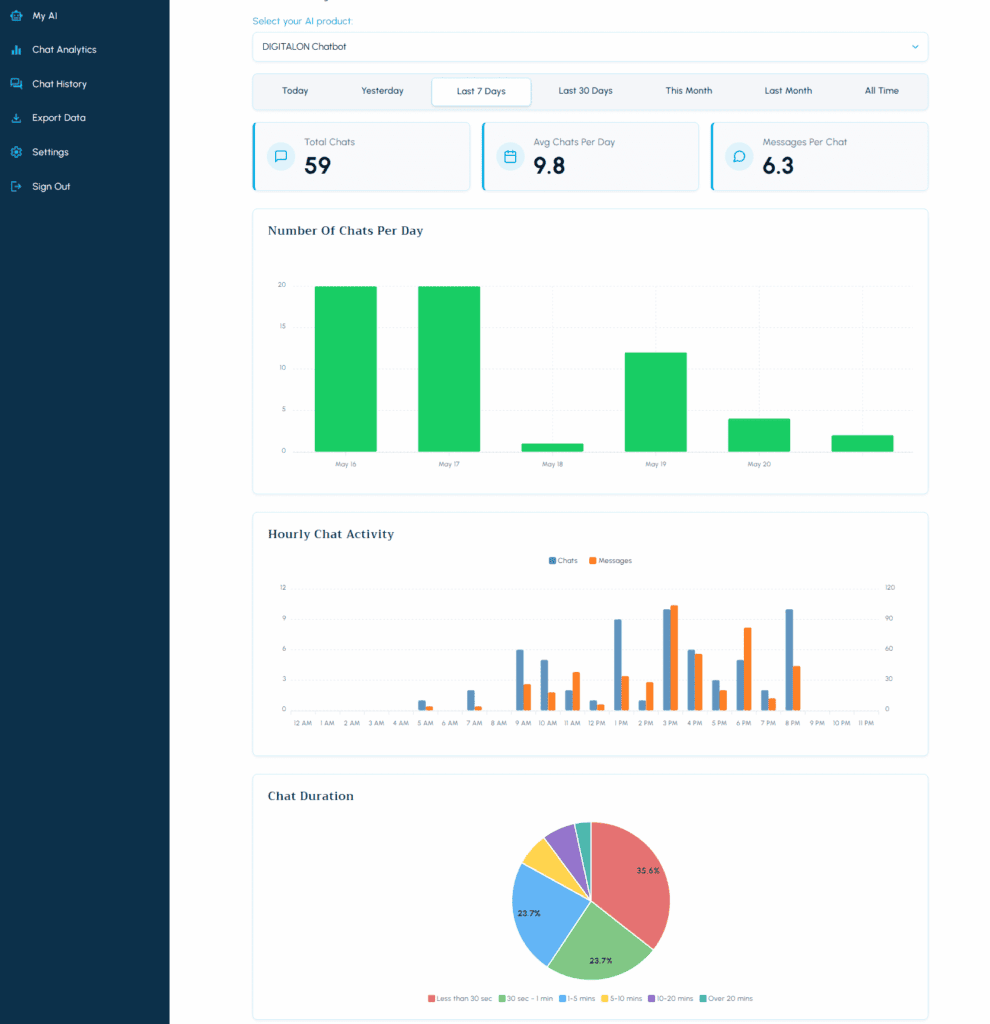
Unlock Your Call Data: Analytics & Histories

Our analytics dashboard turns your call data into a strategic asset. Easily visualise performance, understand customer engagement at a glance, and download complete call histories to make smarter, data-driven decisions.

Australian support from setup onwards

AiDial’s Australian team helps with setup, call-flow changes and ongoing support. Review real outcomes after launch and update the service when hours, systems or staff responsibilities change.

Discuss the calls you want handled

Bring the triggering event, proposed message and the team that will handle replies. We can confirm the messaging and integration scope for a small pilot.

Contact

Frequently asked questions

Using Auto Response Text

What should Auto Response Text handle first?

Start with service questions, order updates, booking changes, ticket intake and callback requests. Choose one or two request types with clear rules, a defined result and an obvious staff handover when the request falls outside scope.

Who is the service designed for?

It is designed for customer service and support teams evaluating business messaging. It works best when the team can describe the request, the desired result and the exceptions staff must retain.

How does the main workflow operate?

AiDial can trigger the agreed message, respect consent and route replies that need a person. The project controls the information used, actions available and destinations for handover.

Can it use our existing business number?

Yes. The service can sit behind an existing number for an agreed call path, or use a separate number where the telephony design requires it. Coverage can include all calls, overflow, after-hours traffic or a dedicated service.

Can it answer outside normal business hours?

Yes. Business-hour and public-holiday rules can select an approved closed-hours path, such as limited information, a message or an on-call destination.

Can it complete bookings or other actions?

Only when the configured integration supports the action and returns a clear result. Otherwise AiDial records the request for staff and does not claim completion.

What happens when it cannot resolve a request?

The fallback can be a transfer, structured message, callback request or safe closure. Complaints, disputes, account decisions and unfamiliar issues move to authorised staff.

How should we measure a pilot?

Measure correct outcomes, accurate handovers, caller drop-off, missing information and staff corrections for the selected requests. Expand only when the failure cases are understood.

Privacy, integrations and support

What information should it collect?

Collect only the details needed to complete or hand over service questions, order updates, booking changes, ticket intake and callback requests. Every requested field should have a documented operational purpose.

How are privacy and consent handled?

The organisation defines the notice, consent rules, access controls and retention settings. AiDial provides configurable controls, while final compliance decisions remain with the organisation and its advisers.

Does the service require call recording?

No. Recording and transcription are project choices. If either is enabled, callers should receive the approved notice and staff access should be limited to the roles that need the record.

Can it verify a caller before sharing information?

Yes, where approved verification is configured. Failed or incomplete verification should lead to a safe handover rather than disclosure of protected information.

Which systems can it connect to?

Supported calendars, CRM tools and business systems can be assessed through their APIs. Confirm the required fields and actions against the current integration options before promising a connection.

How do we keep its information up to date?

Assign a content owner for business hours, services, answers, routing destinations and escalation rules. Test changes with realistic requests before treating them as live.

How is the service priced?

Cost depends on usage, workflow complexity, integrations and support. Compare options using the real workload rather than a headline per-minute figure alone.

How is this different from Auto Text Sender?

This page focuses on business messaging for customer service and support teams. Auto Text Sender covers a broader or adjacent need, so compare the actual workflow, limits and staff handover.


View all FAQs

Connect with an Australian AI Expert

Contact