





Call Centre Automation for Intake, Overflow and Agent Handover

Use voice AI for the repetitive front of a customer call: identify the reason, collect the agreed details and route the caller to the right queue. AiDial can support a defined inbound call-centre workflow with Australian voices and local support. Agents retain complaints, discretionary decisions and requests outside the approved scope.

24/7 Instant Call Support

AI voice

Authentic Australian Voices

Smart Ticket Routing

Escalation to Human Agents

CRM & Knowledge Base Integration

Multi-Channel Support

Automate the first step of a queue, not every decision

Start with one call type that has a predictable outcome. A delivery enquiry, for example, might require an order reference and a choice between approved status information and a staff callback. The assistant should not promise a refund, change a delivery or close a complaint unless that action is explicitly available and authorised.

For support-ticket intake, use Service Desk AI. For ownership across several customer contact paths, see Contact Centre AI.

Why teams use AiDial for this work

Instant Response & Resolution

Provide immediate answers to common questions while complex issues are escalated to human agents seamlessly.

Ensure 100% Australian Compliance

Operate with confidence, knowing your data is hosted locally and meets all privacy laws.

Cut Your Customer Support Overheads

Reduce customer support costs by up to 70% while improving service quality.

Scale Support Capacity Instantly

Meet any customer demand by instantly scaling to manage peak enquiry volumes and business growth, without the overhead of extra staff.

Seamless Human Handover

Complex queries are smoothly transferred to your team with full conversation context and customer history.

Eliminate Staffing Disruptions

Enjoy uninterrupted customer service without sick days, holidays, or staff turnover disruption. Your AI specialises in consistent, reliable support around the clock.

Collect only what the workflow needs

Decide which fields the receiving agent actually needs: contact number, enquiry category, reference and a brief reason for calling. Confirm ambiguous identifiers with the caller. Keep optional information separate from the fields required to route or complete the chosen request.

All AI software and data remain within Australian cloud infrastructure

Compliant with Australian data sovereignty laws

Multi-layered firewalls and strict access control

End-to-end encrypted conversations and data storage

Australian voices with clear pronunciation

Use short prompts when callers are already waiting. Test accents, background noise and interruptions using the names and references your agents hear every day. Give callers a clear route to staff when they cannot complete the automated intake.

Smiling woman with red hair
Ivy
attractive older man smiling - Smiling man outdoors
Hunter
close businesswoman smiling face - Smiling businesswoman in a modern office
Willow
automation legal industry - Smiling man in a library
Liam
cheerful teenage girl smiling face portrait - Smiling woman in a beige turtleneck
Evelyn
portrait young man smiling - Smiling young man in a casual shirt
Finn

Send each request to the right place

Route calls by the caller’s need, business hours and approved destinations. If nobody is available, AiDial follows the agreed message, callback or escalation path.

Keep people in control of exceptions

Intelligent Call Escalation

Pass the reason for calling, the confirmed reference and the outstanding task to the designated team where the integration supports it. Define what happens when the transfer is unanswered or the queue is closed. The caller should hear whether they were connected, left a message or requested a callback.

Manage Your On-Call Roster and Temporary Closures

Manage your on-call roster and temporary closures in the AiDial Portal. Choose approved contacts for dated call cover, with configured fallback cover between assignments.

Availability is subject to setup and activation. Saved changes take effect once AiDial publishes them to your phone line.

Set up Call Center Automation around real enquiries

Custom AI Training from Your Own Content

Map the call flow with the agents who handle the queue. Identify the point where approved information ends and judgement begins. Test a successful request, a wrong reference, an unavailable destination and a caller who changes topic. Keep the workflow small enough that each outcome can be checked before launch.

Consent and clear operational boundaries

Approve call notices, access permissions and recording choices for the queue. Account changes and financial decisions need their own authority checks. Preserve the distinction between collecting a request and executing it.

Overflow Handling for Call Center Automation

Specify the conditions that send calls to AI intake and the destinations that remain available. Review peak-period callers separately from routine traffic so repeated transfers, abandoned calls and unfinished requests remain visible.

Keep follow-up clear across channels

When SMS or email is part of the agreed workflow, send a useful confirmation of the next action rather than a second generic conversation. A callback acknowledgement should state that the request was recorded; it should not imply that an agent has already accepted it.

Keep the number callers already know

Or Get a New 1300 or Local Number

Forward the selected queue or after-hours path from your existing number. Keep the main routing plan intact while the pilot runs. Test that staff can still receive calls through the normal route if the automated path is unavailable.

Systems that can support Call Center Automation

Confirm the exact action supported by the connected CRM or order system. A read of approved status data, a note and a callback request are different operations. Test both a successful response and a failed response before describing any action as completed. See integration planning.

Dedicated Private Voice AI Environment

For organisations with strict sovereignty, isolation, or procurement requirements, AiDial can be deployed as a dedicated Australian voice AI environment. Core services, data stores, networking, and access controls are provisioned for your organisation, giving you stronger separation, tighter governance, and a deployment model suited to government, healthcare, and other security-sensitive operations.

A project configured around your organisation

Conversational AI Platform Built For Australian Businesses

Judge the pilot by correct outcomes: accurate intake, appropriate agent handover and fewer avoidable repeat contacts. Compare the same call type before and after launch. Do not treat call duration or an automated answer as proof of resolution.

Zero Delay: Truly Natural Conversations

Natural conversations don’t have awkward pauses. Our AI is designed to replicate that seamless flow. Because every component of the AiDialâ„¢ platform is hosted locally, we can process conversations with near-zero delay. This means your customers get an immediate, intelligent response every time, leading to higher satisfaction and more productive calls.

AI Chatbot Analytics icon

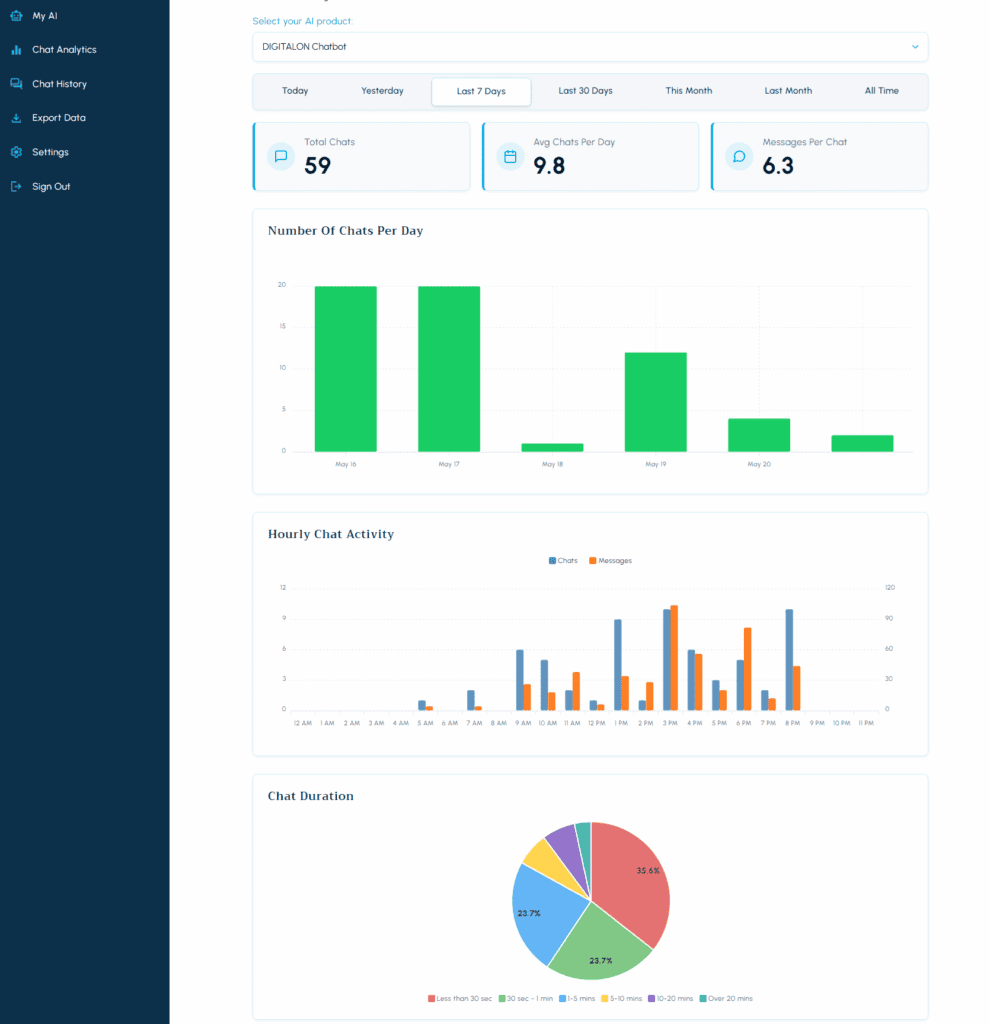
Unlock Your Call Data: Analytics & Histories

Our analytics dashboard turns your call data into a strategic asset. Easily visualise performance, understand customer engagement at a glance, and download complete call histories to make smarter, data-driven decisions.

Australian support from setup onwards

AiDial’s Australian team helps with setup, call-flow changes and ongoing support. Review real outcomes after launch and update the service when hours, systems or staff responsibilities change.

Discuss the calls you want handled

Bring one queue, its top enquiry types and the rules agents follow. We can define a bounded automation pilot and the evidence needed to judge its results.

Contact

Frequently asked questions

Using Call Center Automation

What should Call Center Automation handle first?

Start with service questions, order updates, booking changes, ticket intake and callback requests. Choose one or two request types with clear rules, a defined result and an obvious staff handover when the request falls outside scope.

Who is the service designed for?

It is designed for customer service and support teams evaluating queue and routing operations. It works best when the team can describe the request, the desired result and the exceptions staff must retain.

How does the main workflow operate?

AiDial can capture intent, resolve an approved routine request and route the remaining call with a concise summary. The project controls the information used, actions available and destinations for handover.

Can it use our existing business number?

Yes. The service can sit behind an existing number for an agreed call path, or use a separate number where the telephony design requires it. Coverage can include all calls, overflow, after-hours traffic or a dedicated service.

Can it answer outside normal business hours?

Yes. Business-hour and public-holiday rules can select an approved closed-hours path, such as limited information, a message or an on-call destination.

Can it complete bookings or other actions?

Only when the configured integration supports the action and returns a clear result. Otherwise AiDial records the request for staff and does not claim completion.

What happens when it cannot resolve a request?

The fallback can be a transfer, structured message, callback request or safe closure. Complaints, disputes, account decisions and unfamiliar issues move to authorised staff.

How should we measure a pilot?

Measure correct outcomes, accurate handovers, caller drop-off, missing information and staff corrections for the selected requests. Expand only when the failure cases are understood.

Privacy, integrations and support

What information should it collect?

Collect only the details needed to complete or hand over service questions, order updates, booking changes, ticket intake and callback requests. Every requested field should have a documented operational purpose.

How are privacy and consent handled?

The organisation defines the notice, consent rules, access controls and retention settings. AiDial provides configurable controls, while final compliance decisions remain with the organisation and its advisers.

Does the service require call recording?

No. Recording and transcription are project choices. If either is enabled, callers should receive the approved notice and staff access should be limited to the roles that need the record.

Can it verify a caller before sharing information?

Yes, where approved verification is configured. Failed or incomplete verification should lead to a safe handover rather than disclosure of protected information.

Which systems can it connect to?

Supported calendars, CRM tools and business systems can be assessed through their APIs. Confirm the required fields and actions against the current integration options before promising a connection.

How do we keep its information up to date?

Assign a content owner for business hours, services, answers, routing destinations and escalation rules. Test changes with realistic requests before treating them as live.

How is the service priced?

Cost depends on usage, workflow complexity, integrations and support. Compare options using the real workload rather than a headline per-minute figure alone.

How is this different from Contact Center Automation?

This page focuses on queue and routing operations for customer service and support teams. Contact Center Automation covers a broader or adjacent need, so compare the actual workflow, limits and staff handover.


View all FAQs

Connect with an Australian AI Expert

Contact